Find Out What Your Team Really Thinks
Discover your team's biggest frustrations & best ideas — with 4 powerful culture tools for Slack.

Anonymous Questions: run all-hands, AMAs & town halls

Suggestion Box: collect anonymous ideas & feedback

Polls: get fast signals on your team's preferences & priorities

Kudos: make teammates feel seen, valued & motivated
 Add to Slack (free)
Try for free. No credit card needed!

Approved By Slack
OpenCulture is an approved Slack app, available in the official Slack App Directory.

Anonymity Guarantee
Your identity is never revealed to anyone in your workspace — not even admins.

Privacy First
OpenCulture cannot read any messages in your Slack channels.

EU Data Residency
All data processing and storage happens on EU-based infrastructure.
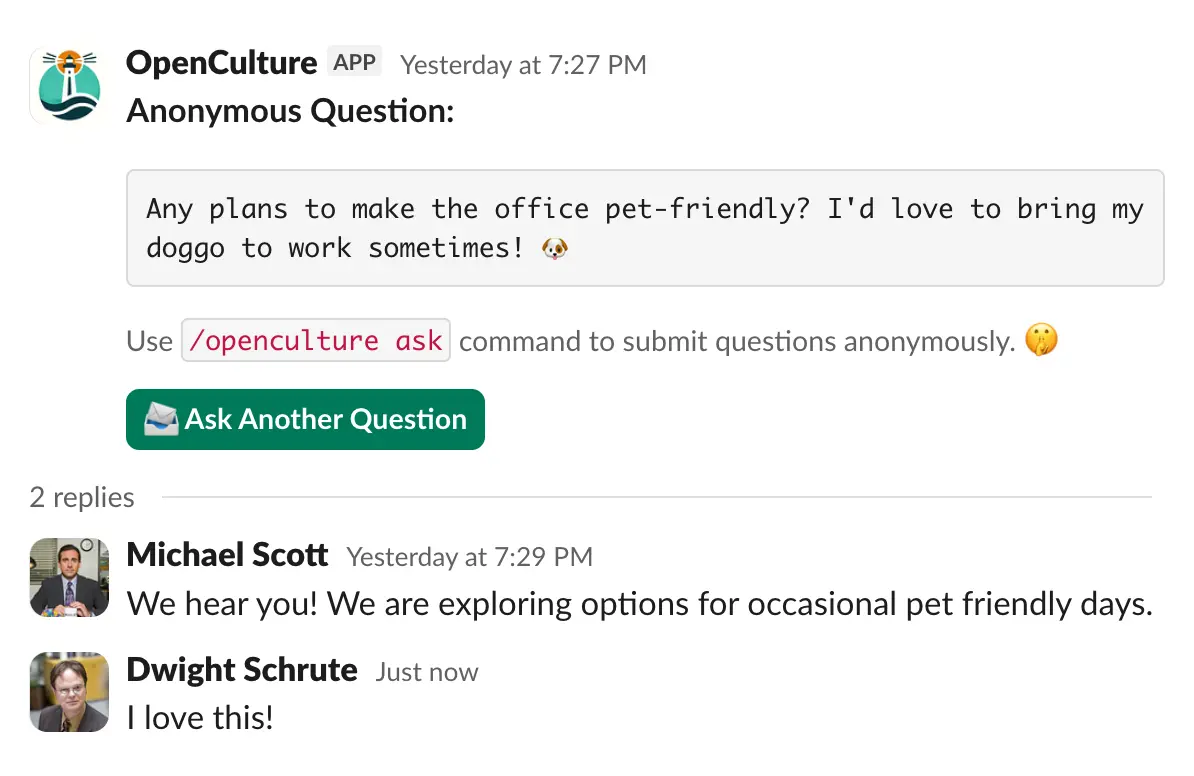
Give your team a voice with anonymous questions
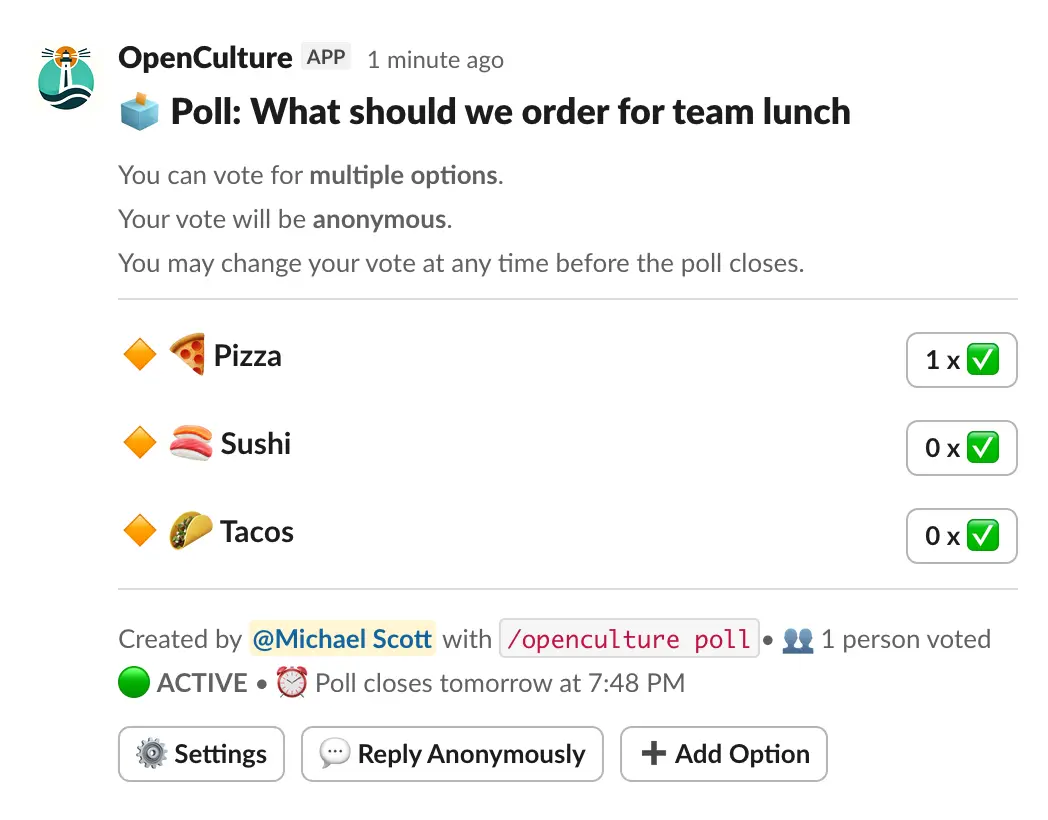
Run polls for quick, candid team decisions
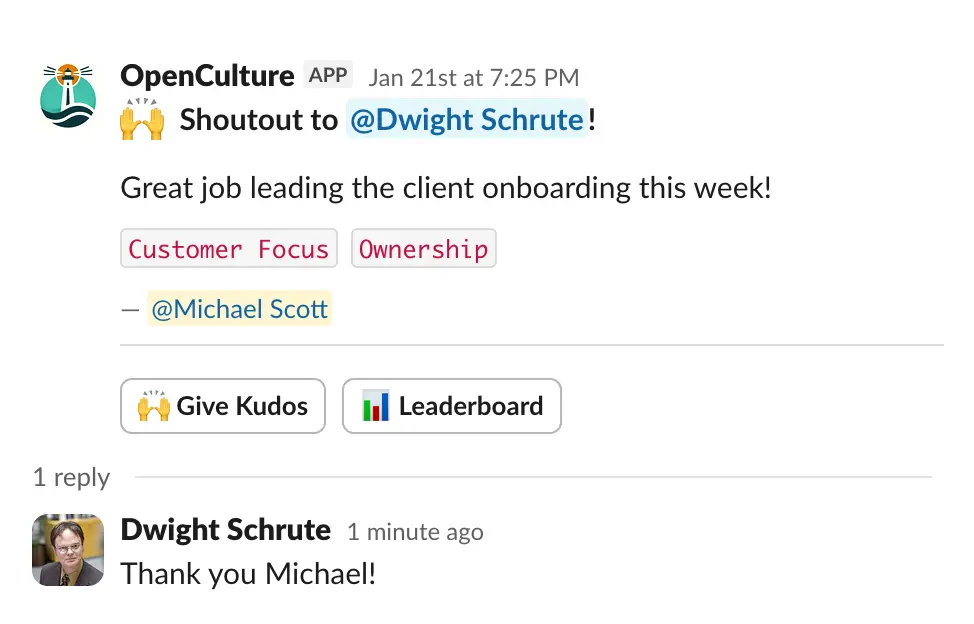
Make teammates feel appreciated and valued
Trusted by Slack teams of all sizes














Features
Enable
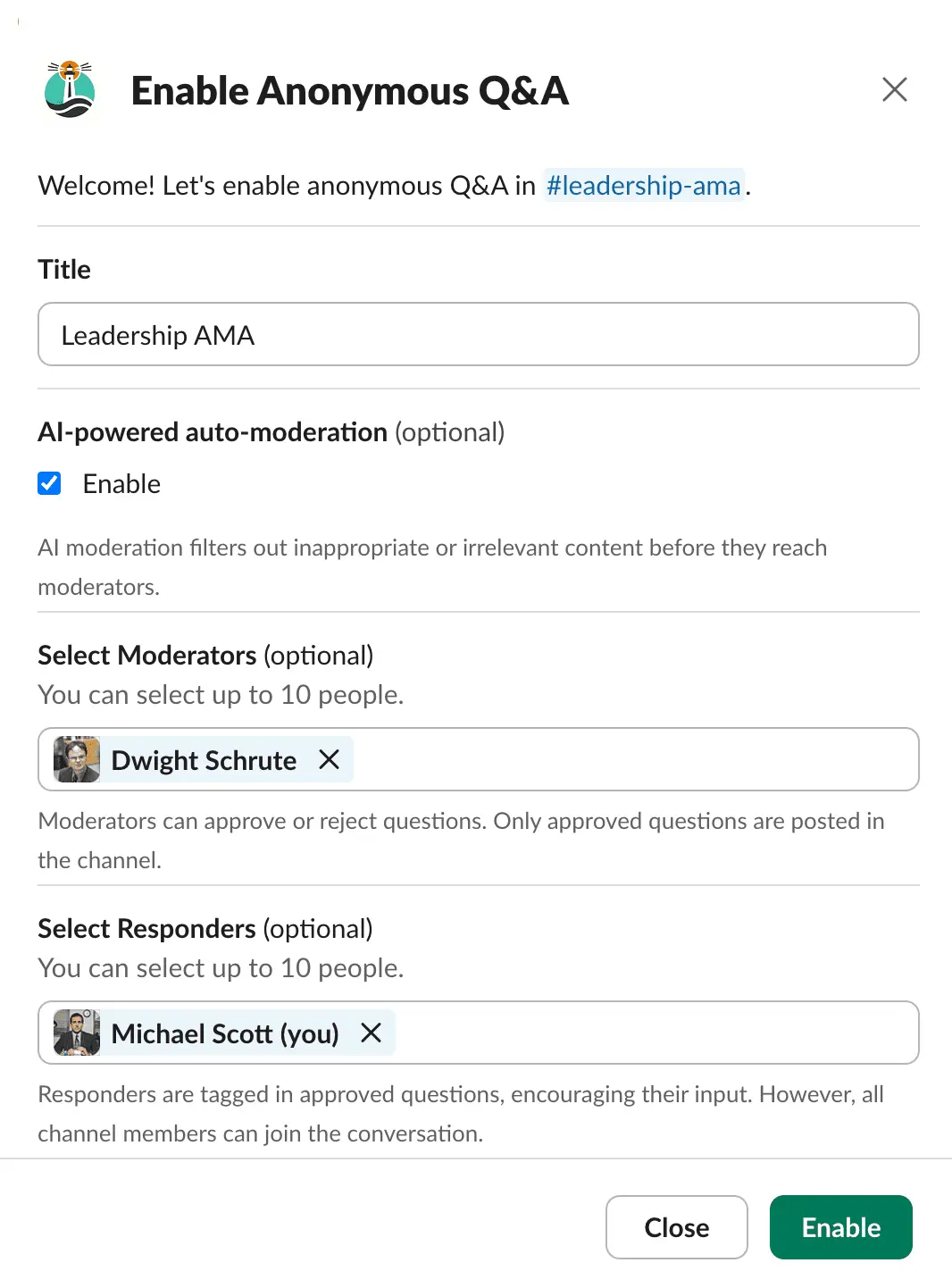
Anonymous Q&A
Let your team ask the questions they're afraid to ask.
Run /openculture qna in any channel to enable anonymous questions — perfect for all-hands meetings, AMAs and town halls.
Team members ask their questions anonymously with the /openculture ask command — their identity stays hidden, even from moderators.
Stay in control with:
- AI-powered auto-moderation
- Manual moderators
- Designated responders
Quick wins: Most teams find a hidden frustration or a confusing policy within the first 3 questions!
Anonymous
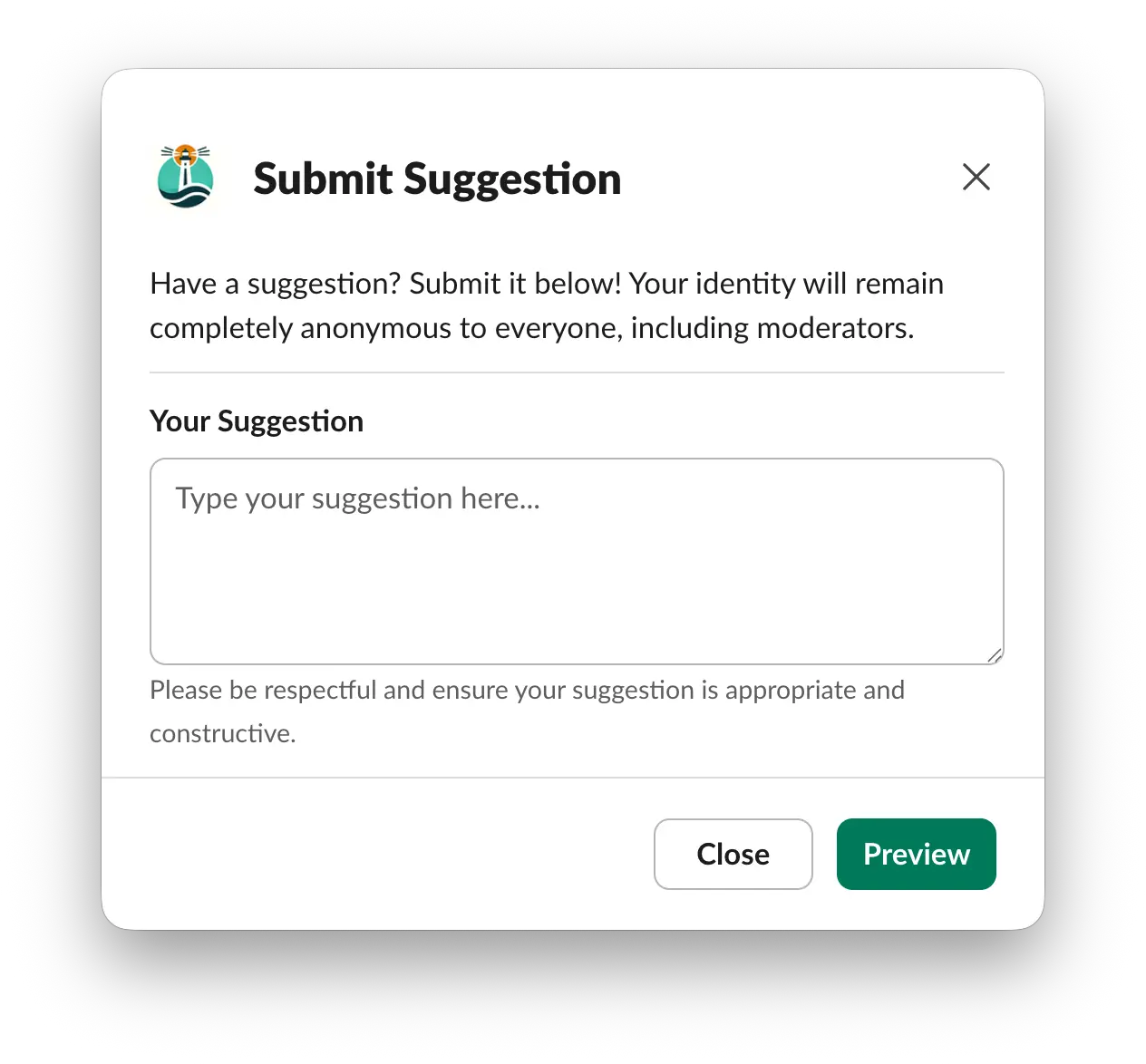
Suggestion Box
Turn any channel into an always-on suggestion box.
Run /openculture suggestionbox to set it up.
Team members share ideas and feedback anonymously with the /openculture suggest command — their identity stays hidden, even from moderators.
Stay in control with:
- AI-powered auto-moderation
- Manual moderators
- Designated responders
Surface hidden ideas: Your best process fix or product idea is often sitting with someone too junior to raise it out loud.
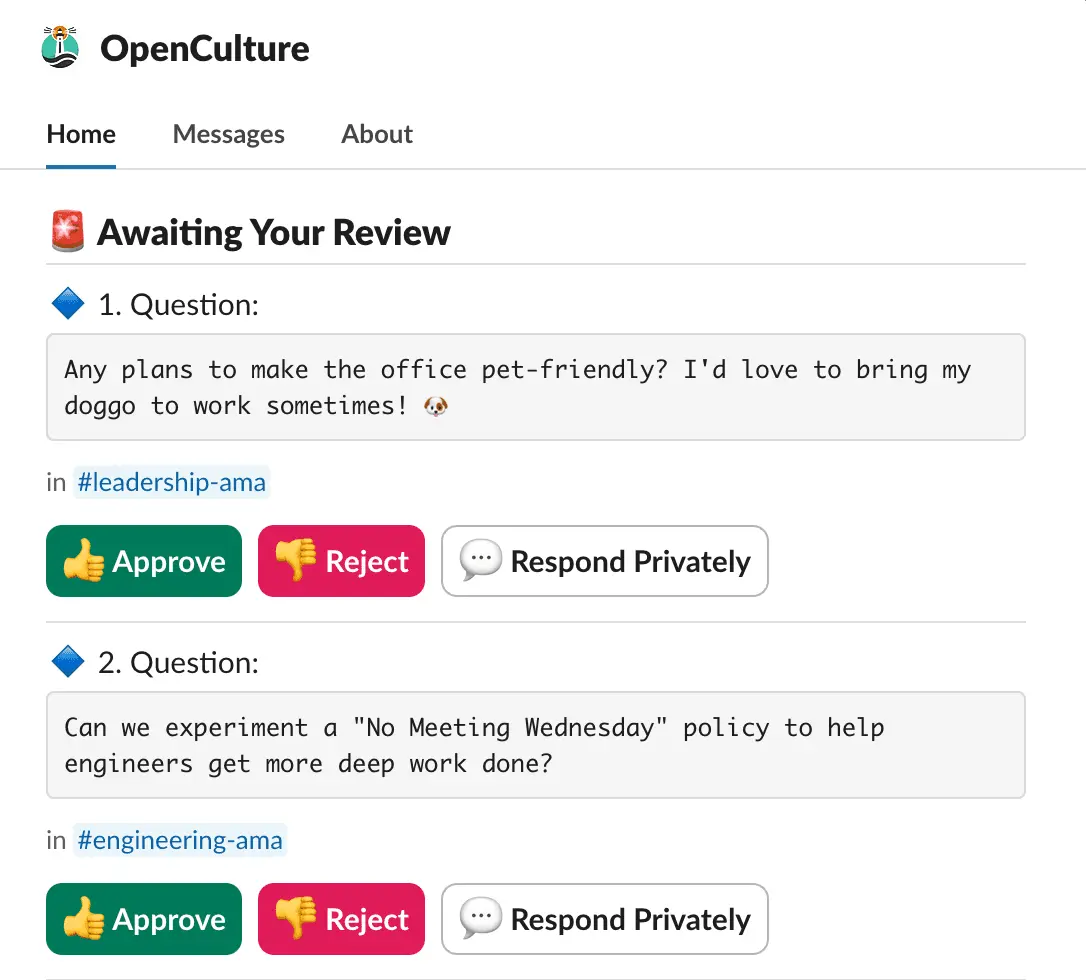
Moderation
features
Prevent abuse or personal attacks under the protection of anonymity, with our moderation features.
🤖 AI-powered moderation automatically filters out inappropriate or irrelevant questions and suggestions, maintaining a focused discussion.
👮🏻♂️ Appoint trusted users as manual moderators to review questions and suggestions before they go live.
✅ Available for both anonymous questions and suggestions.

Anonymous
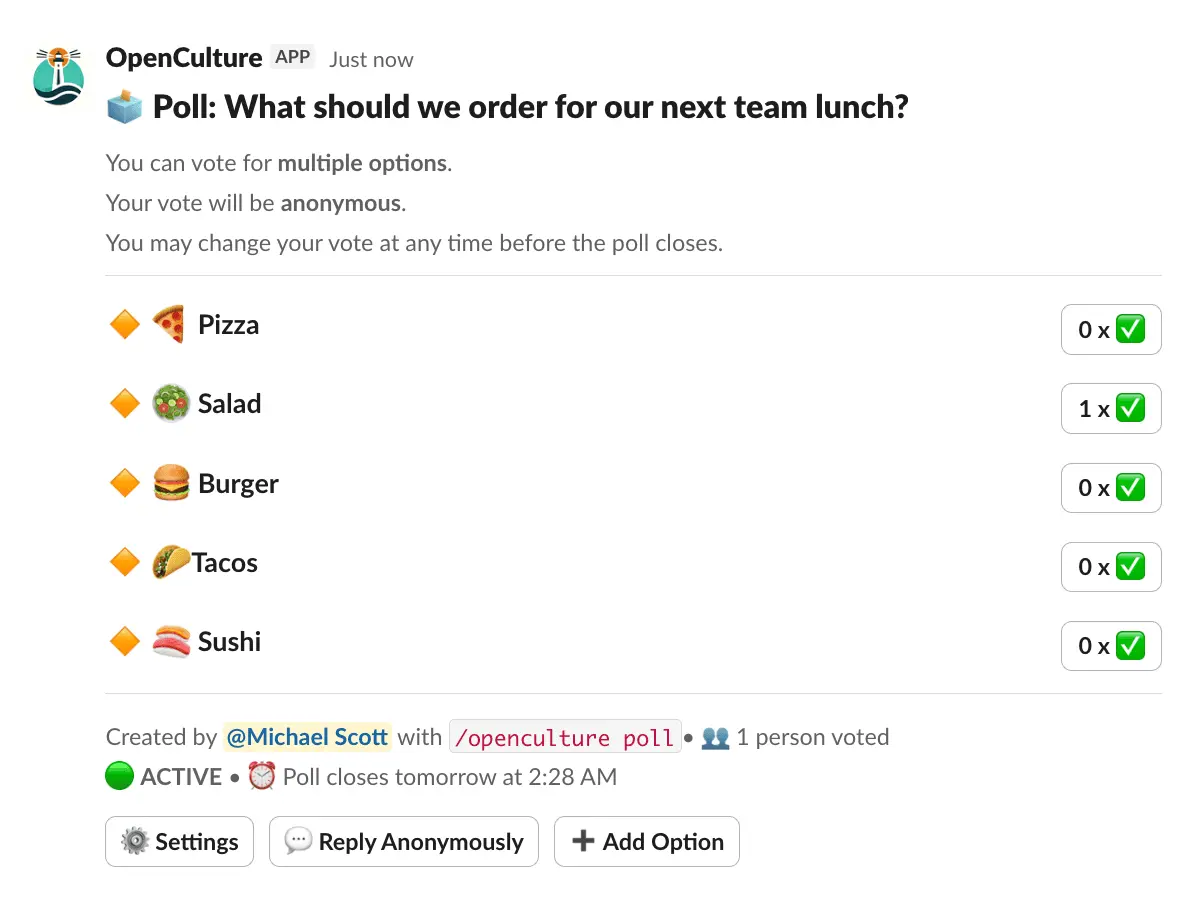
Polls
Use /openculture poll to create & launch polls in any channel. Perfect for pulse checks, brainstorming, or gathering candid feedback.
Granular controls:
- Anonymous voting
- Multiple choice polls
- Limit max choices per voter
- Let participants add options
- Auto-close deadlines
Skip the meeting: Teams replace 30-minute status meetings with a 2-minute poll and get clearer answers.

Kudos &
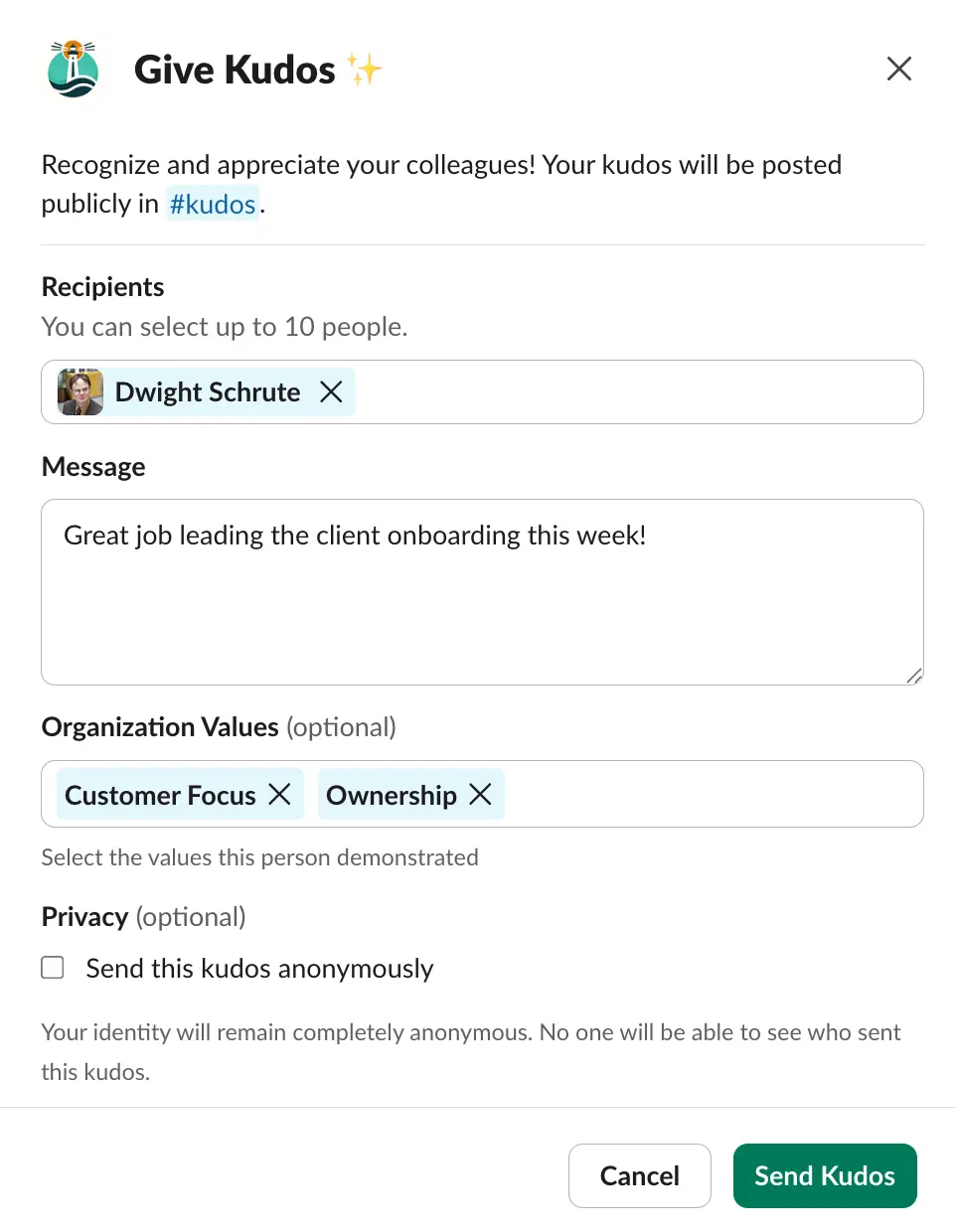
Recognition
Give kudos to teammates with /openculture kudos. Tie recognition to your company values, see who's making an impact, and keep your team motivated.
Granular controls:
- Anonymous kudos
- AI moderation
- Leaderboard
- Company values
- Weekly reminders
- Limit who can give kudos
- Limit how many kudos can be given in a month
Boost your retention: Teams that recognize each other weekly see meaningfully lower voluntary turnover.

Anonymous
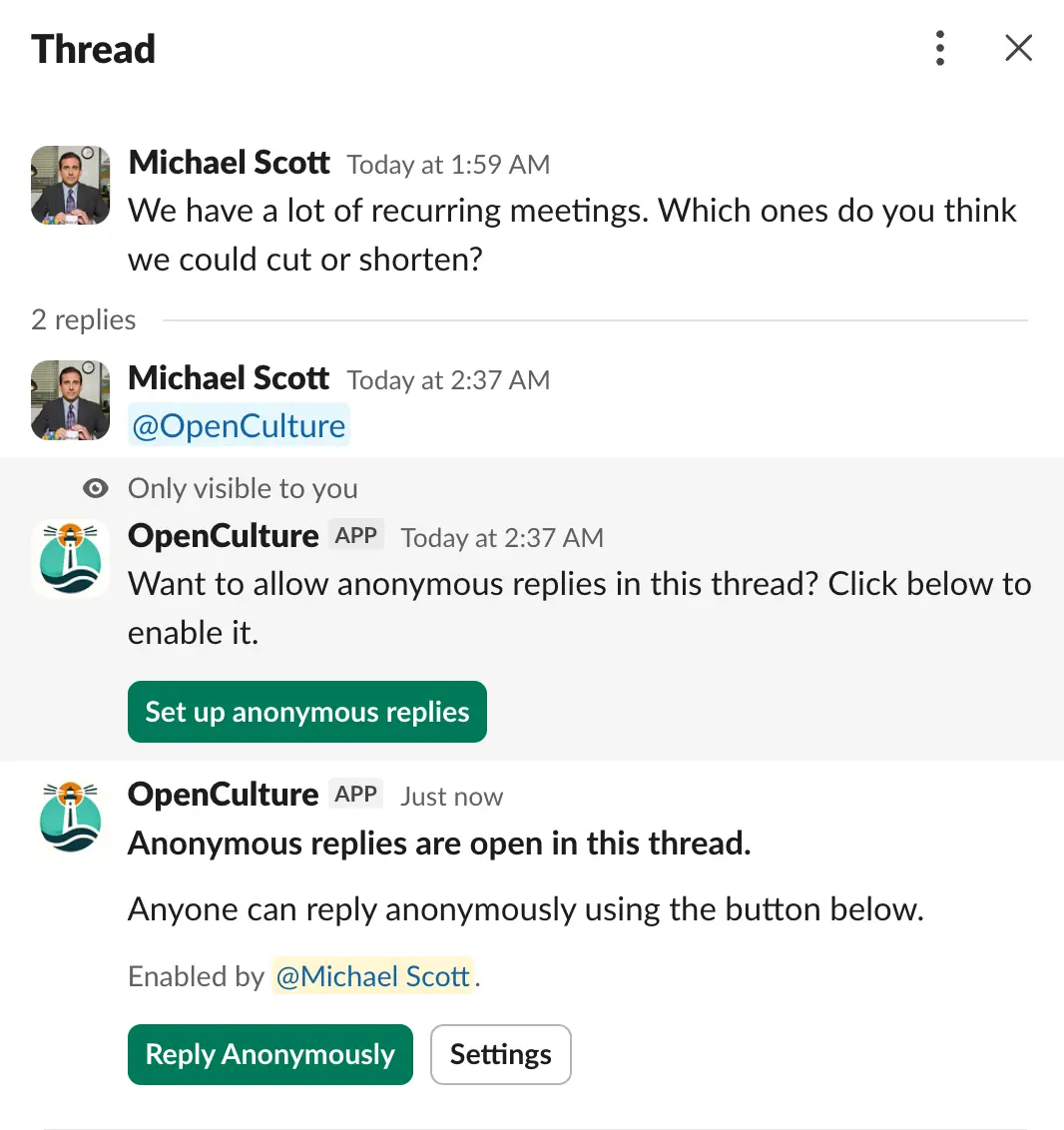
Replies
Enable anonymous comments on any Slack thread.
Tag @OpenCulture in any thread to get started.
What you get:
- Works on any Slack thread
- Team members reply under auto-assigned pseudonyms
- Pseudonyms stay consistent across the thread
- Community flagging removes inappropriate replies
- Close anonymous replies at any time
Hear what your team actually thinks: Leaders use anonymous replies to get honest reactions to decisions — not just what people feel safe saying out loud.
Pricing
One flat price per workspace — no per-person math. Pick the plan that fits your team size; every feature is included on both.
For Slack workspaces with 0–300 members
Every plan includes all features
- ✓Unlimited Anonymous Questions
- ✓Unlimited Anonymous Suggestions
- ✓Unlimited Anonymous Comments
- ✓Unlimited Polls
- ✓Unlimited Kudos
- ✓Manual Moderation
- ✓AI Moderation (opt-in)
 14-day free trial — no credit card required
For Slack workspaces with 300+ members
Every plan includes all features
- ✓Unlimited Anonymous Questions
- ✓Unlimited Anonymous Suggestions
- ✓Unlimited Anonymous Comments
- ✓Unlimited Polls
- ✓Unlimited Kudos
- ✓Manual Moderation
- ✓AI Moderation (opt-in)
14-day free trial — no credit card requiredUse Cases

Company AMA
Host an anonymous all-hands Q&A or Ask Me Anything for your entire organization in a channel like #townhall-qna
Employees can ask questions to top leadership, and leadership can address common concerns and share company-wide updates.
 Add to Slack (free)
Suggestions Box
Create a #suggestion-box channel where employees can submit ideas, feedback, and suggestions.
This can include ideas for enhancing processes, tools, company culture, employee engagement, and more.
Add to Slack (free)
Team level Q&As
Set up dedicated channels for team level Q&As, like #engineering-qna or #marketing-qna.
Leaders can answer questions from the team about their roles, responsibilities, and team-specific challenges while maintaining anonymity.
Add to Slack (free)
Kudos / Shoutouts Channel
Create a #kudos channel where teammates publicly thank and appreciate each other.
Give kudos tied to your company values and make great work visible—whether it's shipping a tough feature, helping a colleague, or going the extra mile.
Add to Slack (free)FAQs
Installation & Setup
How do I install OpenCulture?
You can install OpenCulture from our install page or the Slack App Directory.
In some Slack workspaces, installing Slack apps may be restricted to workspace admins.
If you visit the Slack App Directory and don't see the install option or are told you don't have permission, reach out to your Slack workspace admin (which may be someone on your IT team) to install it for you.
How do I enable anonymous questions in a channel?
Navigate to the channel where you want to enable anonymous questions and type /openculture qna. You'll be presented with a configuration screen where you can set up moderation options and other settings.
How do I set up a suggestion box?
Navigate to the channel where you want to collect suggestions and type /openculture suggestionbox. You'll be presented with a configuration screen to set the title, enable AI auto-moderation, and assign moderators and responders. You can also launch the same setup from the OpenCulture Home tab. Once enabled, team members submit ideas anonymously with /openculture suggest.
Are anonymous questions enabled by default in all Slack channels?
No. Anonymous questions can only be submitted in channels where they have been explicitly enabled. You or someone from your team must manually enable it in each channel where you want to use it.
Free Trial & Pricing
Do you offer a free trial?
Yes, we offer a 14-day trial to all new installations.
Do you charge per person?
No. It's a flat monthly fee based on your workspace size — not per-user. Pick the tier that matches your team (up to 300, or 300+) and everyone in your workspace gets full access. No per-seat charges, no surprise bills.
Do you offer annual billing?
Yes, we support annual billing with a two-month discount — you pay for 10 months instead of 12. For example, the Startup plan would be $300/year instead of $360/year.
What happens once the trial period expires?
After the trial period ends, core features like submitting anonymous questions and running polls will be disabled. You'll need to upgrade to a paid plan to continue using OpenCulture.
How to upgrade my plan after trial period?
You can upgrade directly from the OpenCulture app in Slack. If you need any help with the process, feel free to reach out to us at [email protected].
Data Privacy
What data does OpenCulture access & store from Slack?
We use minimal Slack permissions. We access basic profile info (name, Slack user ID, timezone) but not email addresses. We cannot read any messages posted in your Slack channels — the only content accessible to our application is what users explicitly submit through OpenCulture.
Moderation & Anonymity
Can questions be reviewed before being posted?
Yes. When you enable anonymous Q&A in a channel, you can assign moderators or reviewers. Any question submitted goes to moderators for approval first — only approved submissions are posted to the channel.
Do you have AI moderation?
Yes. We offer AI-powered moderation that automatically detects and filters inappropriate or offensive content. This is optional and configurable at the channel level.
Can workspace admins or moderators see who submitted an anonymous question?
No. The identity of the person submitting an anonymous question or suggestion is never exposed to anyone — not workspace admins, moderators, channel creators, or anyone else in your workspace.
Can I use OpenCulture for our all-hands meeting Q&A?
Yes — it's one of the most common ways teams use OpenCulture. Enable anonymous Q&A in a channel like #all-hands-qna, and employees can submit questions anonymously before or during the all-hands. Moderators can review questions before they're posted, so leadership can prepare thoughtful answers.
Data & GDPR Compliance
Is all data stored within the EU? 🇪🇺
Yes. All OpenCulture infrastructure that handles customer data runs entirely on EU-hosted infrastructure. Read more about our data sub-processors.
Do you provide a DPA for GDPR compliance?
Yes. We're happy to sign a Data Processing Agreement (DPA) for GDPR compliance. Reach out to [email protected] to get started.
What is your data retention policy?
All usage data (questions, polls, etc.) is automatically deleted from our databases, 14 days after uninstallation. You can submit data deletion requests to us via our support email at any point of operation before uninstallation as well.
Support & SLA
What is your uptime target?
We target 99.9% uptime for our service.
What are your support response times?
- Critical issues: within 8 business hours
- General inquiries & other low priority issues: within 2 business days
Support is available Monday–Friday, 9 AM – 6 PM IST (UTC+5:30).
Do you offer a formal Service Level Agreement (SLA)?
If you require a formal SLA with specific guarantees, we're happy to review and work with your standard SLA template. Email us to get started.
Where can I contact you if I have questions, feedback?
For any inquiries or feedback, please contact our support team at [email protected]. We are here to assist you and ensure your experience with our app is seamless and productive.
Disclaimer: OpenCulture utilizes AI/LLM technology for automatic moderation. While we strive for accuracy, AI moderation is not perfect and may result in false positives or false negatives. This feature is optional and should be used at your discretion based on the sensitivity and importance of your specific use case.
 Benefits
Employees Perform Best When They Feel Heard
Improve Morale
“Employees who feel their voice is heard are 4.6 times more likely to feel empowered to perform their best work.”
Salesforce study, “The Impact of Equality and Values Driven Business”

Reduce Attrition
“Employees who feel they cannot speak up are more likely to disengage and exhibit higher turnover intentions.”
Journal of Organizational Behavior

Psychological Safety
“Psychological safety, or the belief that one will not be punished or humiliated for speaking up with ideas, questions, or concerns was the most important factor that set successful teams apart.”
Project Aristotle, Google
Featured Blogs
How to Send Kudos in Slack: Complete Guide
January 21, 2026
How to create a Poll in Slack
November 1, 2025
How to create a Multiple Choice Poll in Slack
October 31, 2025
How to create an Anonymous Poll in Slack
August 29, 2025
25 Useful Questions to Ask Leadership (or Your CEO) in a Town Hall
July 29, 2025
How to host a Leadership AMA Town Hall on Slack (Step-by-Step Guide)
May 26, 2025
Complete Slack Employee Onboarding Guide: Useful Apps, Workflows, and Tips (2026)
April 18, 2025
Set up Slack Suggestion Box (Anonymous & Easy)
April 16, 2025
How to Ask Anonymous Questions in Slack
April 14, 2025
How to Add a Bot to a Slack Channel
April 23, 2024
Ready to find out what your team really thinks?
Set up anonymous questions, suggestion boxes, polls & kudos in your Slack workspace — in under 2 minutes.
14-day free trial · No credit card needed