
Every great workplace runs on honest conversations. When your team feels safe to share their real thoughts — whether it's a game-changing idea, a process that's broken, or feedback that could transform how you work — magic happens.
Anonymous suggestion boxes aren't just nice-to-have tools; they're the bridge between what employees are thinking and what leaders need to hear. When people know their suggestions won't be tied to their name, they share real issues and ideas more candidly.
The challenge isn't convincing people that feedback matters — it's finding the right platform to make sharing effortless and meaningful.
This comparison examines two popular tools for collecting anonymous feedback – Suggestion Ox and OpenCulture – to help HR teams, founders, and executives choose the right solution for fostering an open culture.
Feature-by-Feature Comparison
| Feature | Suggestion Ox | OpenCulture |
|---|---|---|
| Pricing | $99-$299+/month | $30-$100/month |
| Anonymity | ✅ Complete anonymity, two-way conversations | ✅ Complete anonymity via Slack bot |
| Platform | Web-based, Slack notifications only | Slack-native, no external platform needed |
| Setup | Admin account setup, link sharing | One-click Slack app install |
| Submission | Web form via link/QR code | /openculture suggest command in Slack |
| Two-Way Chat | ✅ Direct Replies (paid plans) | ✅ Public threads + private replies |
| Moderation | ❌ No built-in filtering | ✅ AI filtering + human moderation |
| Duplicate Detection | ❌ None | ✅ Smart duplicate prevention |
| Analytics | ✅ Sentiment analysis, keyword trends | ❌ Basic Slack metrics only |
| Customization | ✅ High - multiple forms, branding | ❌ Limited - standardized experience |
| Integrations | Slack/Teams notifications, API | Slack only (deep integration) |
Suggestion Ox Overview
Suggestion Ox is a web-based anonymous suggestion box platform. It provides a secure, confidential channel for employees to submit feedback without fear.
Key Features
100% Anonymous Submissions
- Guaranteed anonymity with no identity tracking
- Encourages honest, unbiased feedback
Two-Way Anonymous Conversations
- Direct Replies feature (higher plans only)
- Back-and-forth dialogue while preserving anonymity
Multi-Channel Access
- Web forms accessible on any device
- Shareable via unique links or QR codes
- Slack and Microsoft Teams integration for notifications
- Not limited to Slack – works at meetings, via browser, etc.
Customizable Forms
- Multiple suggestion "boxes" for different purposes
- Custom form fields, branding, and URLs
- Company logo and color customization
Case Management
- Tag and categorize suggestions
- Assign to team members
- Track status from submission to resolution
- Keyword and sentiment analysis (higher tiers)
- Public voting on suggestions (Silver plan+)
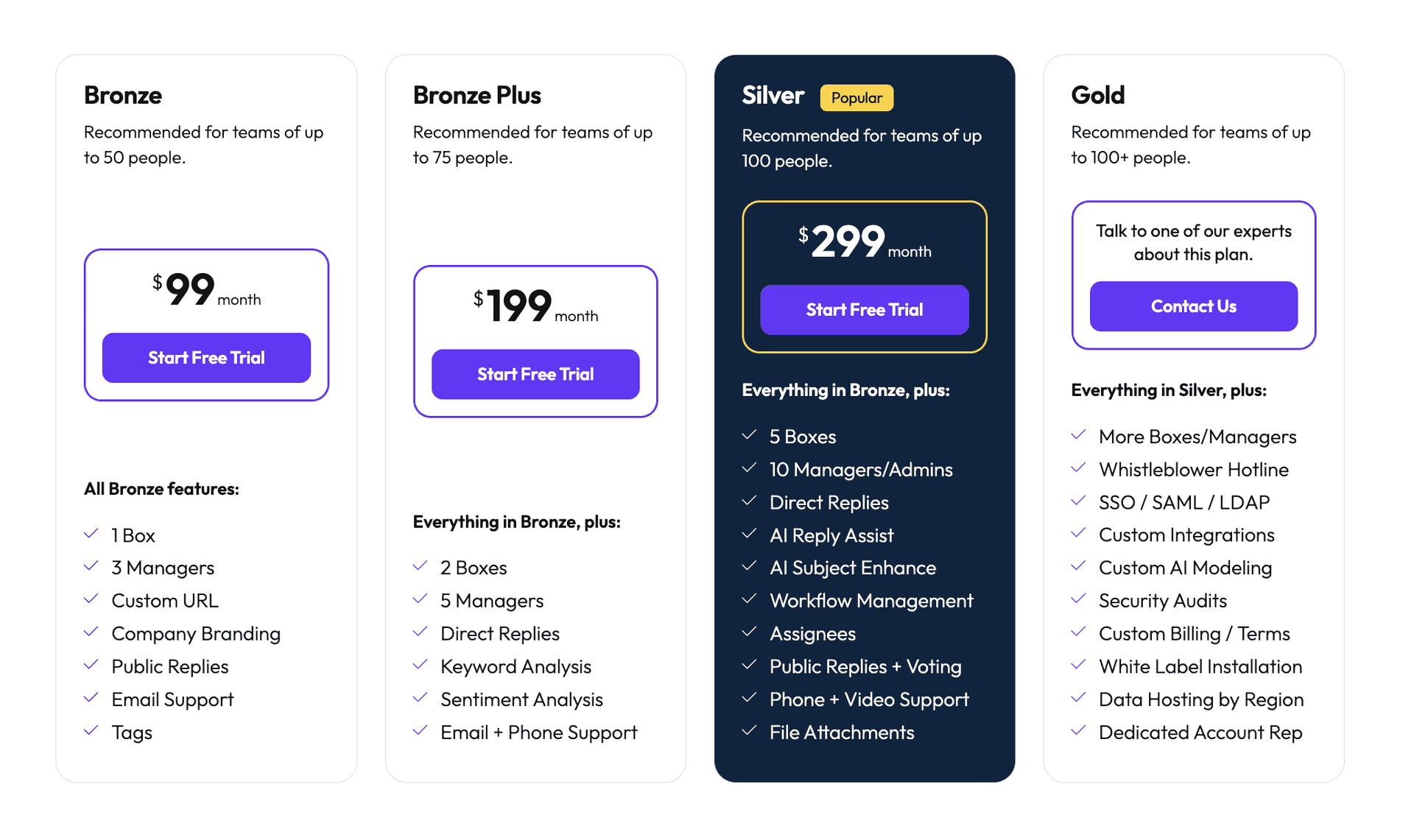
Pricing
- 14-day free trial (no credit card required)
- Bronze Plan - $99/month (up to 50 people)
- Bronze Plus - $199/month (up to 75 people)
- Silver - $299/month (up to 100 people)
- Gold - Custom pricing (100+ people)
Annual billing offers discounts (Bronze ~$83/month when paid annually)
See here for more details.
Known Limitations - Where Suggestion Ox Falls Short
Not Slack-Native
- Primarily web-based platform
- Employees must click external links to submit feedback
- Slack integration only for notifications, not direct submission
- Extra context switch may reduce participation
Dated User Experience
- Functional but outdated design (blue-and-black theme)
- May reduce employee engagement
- Though some praise its simplicity
Feature Paywalling
- Advanced features locked behind expensive tiers
- SSO requires Gold plan
- Small organizations may find limitations frustrating
No Built-In Content Moderation
- No AI-powered filtering of inappropriate submissions
- Relies on manual admin review
- All content goes directly to private admin dashboard
OpenCulture Overview
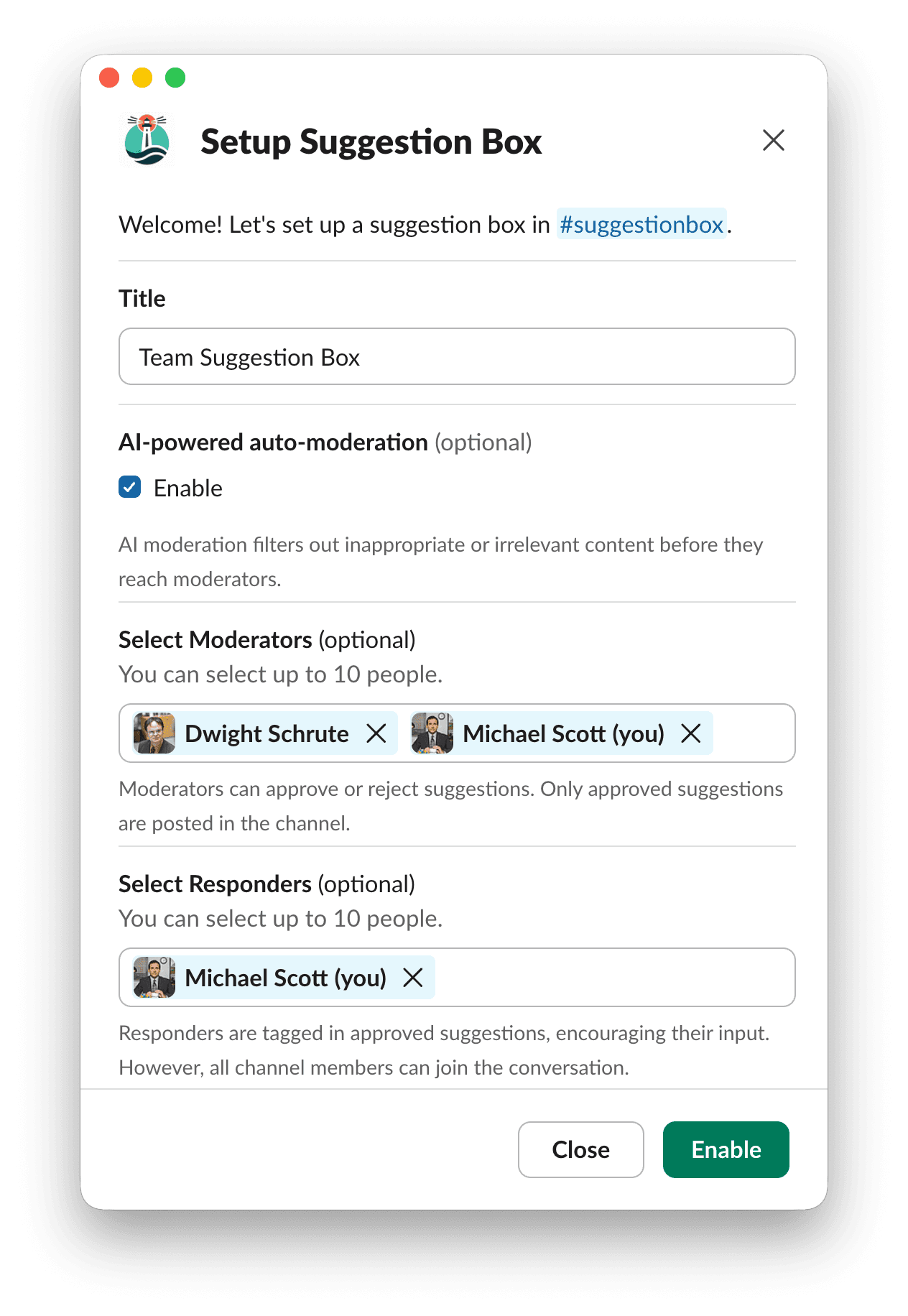
OpenCulture takes a different approach as a Slack-native anonymous suggestion box and feedback tool. Instead of a separate portal, it lives directly in Slack, turning any channel into an anonymous suggestion box.
Key Features
Slack-Native Operation
- Works entirely within Slack
- Install from official Slack App Directory
- Enable with simple
/openculture suggestionboxcommand - No separate logins or accounts needed
Anonymous Submissions in Slack
- Use
/openculture suggestcommand to submit suggestions - Private window for typing
- Posted by OpenCulture bot as "Anonymous"
- Perfect for always-on suggestion channels, AMAs, or town halls
Built-In Moderation System
- AI-powered filtering: Automatically catches inappropriate content
- Manual moderation: Trusted team members can review before posting
- Two-layer system prevents abuse of anonymity
- Maintains respectful, on-topic discussions
Duplicate Question Detection
- Intelligently identifies similar questions
- Alerts users before posting duplicates
- Suggests checking existing answers first
- Reduces repetitive submissions in your suggestion box
Slack Threaded Engagement
- Questions posted in designated channels
- Leaders answer directly in Slack threads
- Creates a live, interactive feedback loop
- Everyone sees both questions and answers
Private Reply Option
- Moderators can respond privately to sensitive submissions
- Maintains anonymity in both directions
- Handles personal concerns not relevant to all
Privacy Controls
- Choose which channels collect anonymous feedback
- Designate moderators and responders per channel
- Minimal data storage (questions only)
- Data deleted within 14 days if app uninstalled
Pricing
14-day free trial (up to 100 anonymous questions)
Startup (up to 300 people): $30/month
- Unlimited users and questions
- All features included
Enterprise (300+ people): $100/month
- Unlimited users and questions
- All features included
See here for more details.
Common Use Cases
- Channels like #ask-leadership for company-wide questions
- Encourages open dialogue about strategy and changes
- Persistent #suggestions channel for continuous feedback
- Real-time responses from HR or managers
- New hire questions without fear of judgment
- Identifies common onboarding pain points
Diversity & Inclusion Feedback
- Safe space for sensitive topics
- Underrepresented groups can speak up anonymously
Team-Specific AMAs
- Department channels for technical or team-specific questions
- Breaks down communication barriers
Why OpenCulture Often Outperforms Suggestion Ox
1. Seamless Slack Experience = Higher Engagement
OpenCulture's Slack-native design eliminates friction. Employees don't need to:
- Leave Slack
- Remember a separate tool
- Navigate to external websites
- Worry about login tracking
Real-world impact: During an all-hands meeting, someone can instantly ask an anonymous question in the #townhall channel. With Suggestion Ox, they'd need to click a link, open a web form, and wait for an admin to relay the question.
2. Proactive Moderation for Safe Discourse
OpenCulture addresses the biggest concern with anonymous feedback: potential abuse.
AI filtering catches inappropriate content before it reaches leadership. Human moderation ensures productive discussions. One-click approval keeps conversations flowing.
Suggestion Ox leaves moderation entirely to manual admin review after submission.
3. Fewer Duplicate Submissions
OpenCulture's duplicate detection keeps your suggestion box clean. Instead of fielding "Can we get standing desks?" ten times, the system guides people toward existing submissions and responses.
This respects everyone's time and keeps the channel focused on unique, actionable feedback.
4. Dramatic Cost Savings
200-person company example:
- Suggestion Ox: ~$299/month
- OpenCulture: $30/month
- Savings: 90%
OpenCulture includes all features at every price point. Suggestion Ox gates advanced features behind expensive tiers.
5. Modern, Intuitive Interface
OpenCulture leverages Slack's familiar interface with:
- Interactive pop-up screens
- Clear buttons and commands
- No learning curve
- Psychological comfort of using a trusted internal tool
6. Transparency and Shared Learning
Public Slack channels create an archive of suggestions and responses that:
- Everyone can reference and search
- Dispels rumors through open answers
- Builds trust over time
- Helps future hires understand company culture
7. Focused Simplicity
While Suggestion Ox offers many features, OpenCulture focuses on core feedback needs:
- Anonymous questions
- Safe moderation
- Easy access
- Quick responses
This clarity of purpose eliminates configuration overhead and gets feedback programs running quickly.
When Suggestion Ox Might Be Preferred
Non-Slack Organizations
- Companies not using Slack or Teams
External Access Needs
- Feedback from contractors or ex-employees
- Stakeholders without company Slack access
Advanced Analytics Requirements
- Built-in sentiment analysis
- Detailed categorization and reporting
- Data slicing by departments or topics
Compliance Use Cases
- Legal compliance reporting
- Audit trail requirements
- Phone hotline integration
Conclusion
Both tools enable anonymous feedback, but they serve different needs:
Suggestion Ox is a comprehensive, configurable platform for organizations needing advanced features, external access, or compliance capabilities – at a premium price.
OpenCulture is a focused, affordable solution for Slack-based teams wanting to build open culture through seamless, moderated anonymous conversations.
The Bottom Line
For modern companies living in Slack, OpenCulture typically outperforms Suggestion Ox by:
- Eliminating friction – feedback happens where work happens
- Ensuring safety – robust moderation prevents abuse
- Saving money – 70-90% cost reduction
- Building transparency – open conversations build trust
If your goal is boosting candid employee feedback in a Slack-centric environment, OpenCulture delivers exactly what you need at a fraction of the cost, making it easier than ever to hear what your team really thinks – and do something about it.
Frequently Asked Questions
What is a cheaper Suggestion Ox alternative for Slack?
OpenCulture can be a cheaper Suggestion Ox alternative for Slack-based teams that need anonymous suggestions, moderated Q&A, polls, and kudos. Actual savings depend on your team size, current plan prices, and whether you need Suggestion Ox's external forms or compliance-oriented features.
Which Suggestion Ox alternative works directly inside Slack?
OpenCulture runs the anonymous feedback workflow inside Slack, including submission, moderation, posting, and threaded follow-up. It is a strong Suggestion Ox alternative for teams that want employees to give feedback without opening a separate form or platform.
How does OpenCulture compare with Suggestion Ox?
OpenCulture keeps feedback and follow-up conversations in Slack, while Suggestion Ox is a separate feedback platform with broader form, reporting, and compliance-oriented capabilities.
When is Suggestion Ox better than OpenCulture?
Suggestion Ox may be a better fit for organizations that need external web forms, phone hotlines, advanced reporting, or compliance workflows beyond a Slack-based feedback program.


