
Why Anonymous Replies Matter in Slack
Most Slack conversations happen in the open — and that's usually fine. But there are moments when people hold back:
From the team's side:
- Responding to a leadership announcement they disagree with
- Adding a dissenting opinion to a team decision thread
- Commenting on a sensitive topic without fear of social friction
- Providing honest feedback in a poll or Q&A session
From the leadership side:
- Hearing what the team actually thinks, not just what sounds safe to say
- Spotting patterns in concerns before they become bigger issues
- Getting candid input on decisions without status dynamics skewing responses
- Creating space where quieter voices contribute as much as louder ones
The result? Important perspectives go unheard. Anonymous comments give people a safe way to participate — turning passive lurkers into active contributors.
Does Slack Support Anonymous Replies?
No. Slack does not have any built-in support for anonymous replies or anonymous comments. Every message, reaction, and thread reply in Slack is permanently tied to your user account.
The only way to get anonymous replies in Slack is through a third-party app — and that's exactly what OpenCulture provides.
How to Enable Anonymous Replies with OpenCulture
OpenCulture is a privacy-first Slack app that brings anonymous communication to your workspace. It already lets you ask anonymous questions in Slack and run anonymous polls — and most recently, it adds anonymous replies on any Slack thread.
Once installed, any Slack admin or channel manager can enable anonymous replies on a thread in seconds. Team members can then reply anonymously with a single click.
Install via the button below or head over to OpenCulture in the Slack App Marketplace. No permissions? Ask your Slack admin to install it for your workspace.
OpenCulture gives you two convenient ways to open up anonymous replies on any thread:
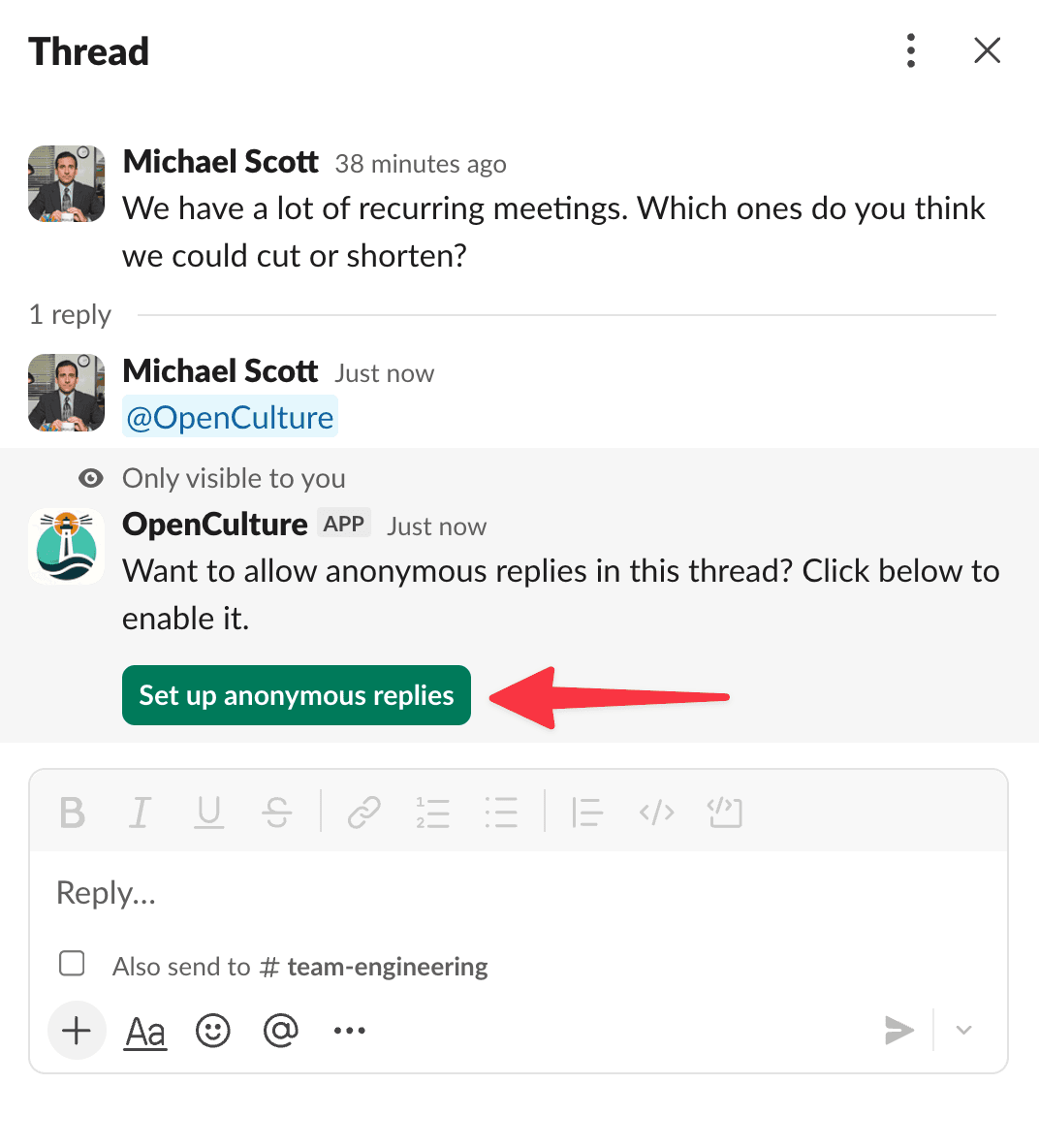
Method 1: Tag @OpenCulture in a Thread
Navigate to any thread in Slack and type @OpenCulture in a reply. The bot will immediately respond (only visible to you) with a button to Enable Anonymous Replies for that thread.
Method 2: Use the Message Shortcut
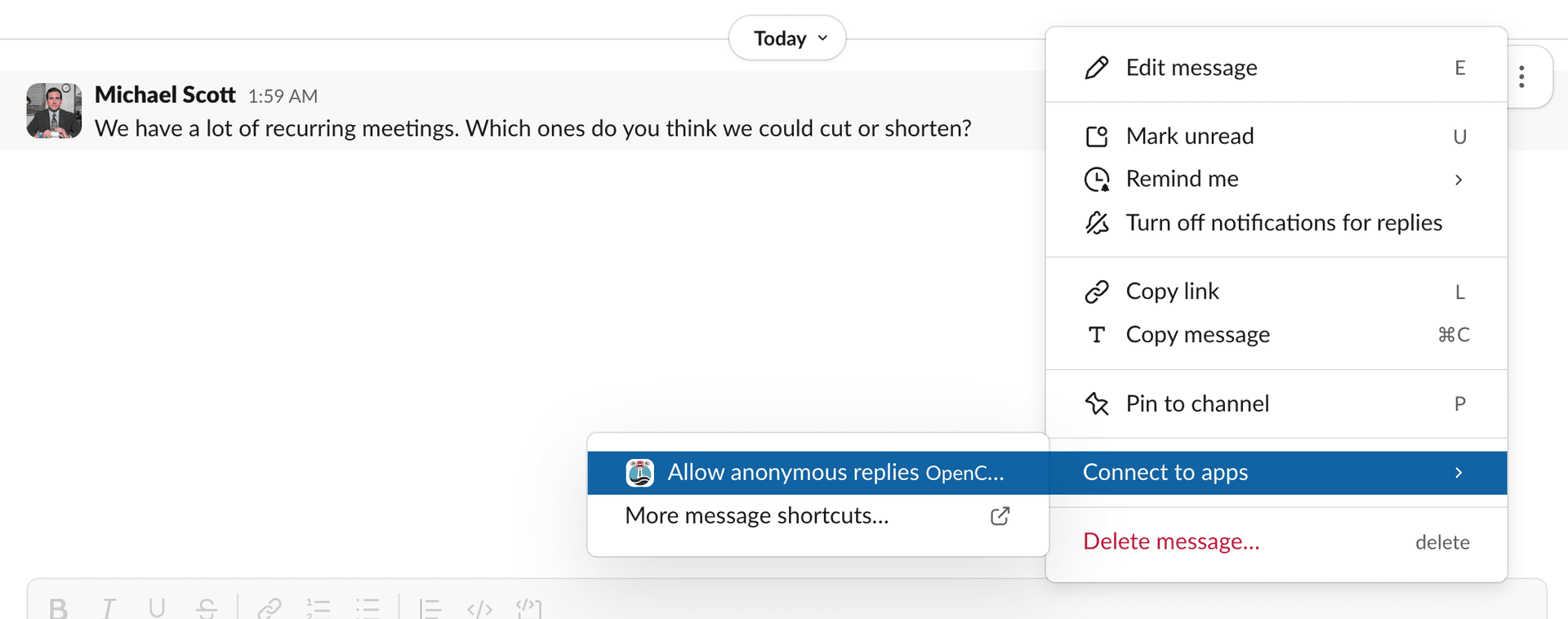
Hover over any Slack message and click the three-dot menu (⋯) that appears. Under Message Shortcuts, select Allow Anonymous Replies. This opens the same setup screen — no need to type anything.
The message shortcut works on both the root message and any message within a thread. Whichever message you right-click, OpenCulture will enable anonymous replies for the entire thread.
Step 1: Configure and Enable
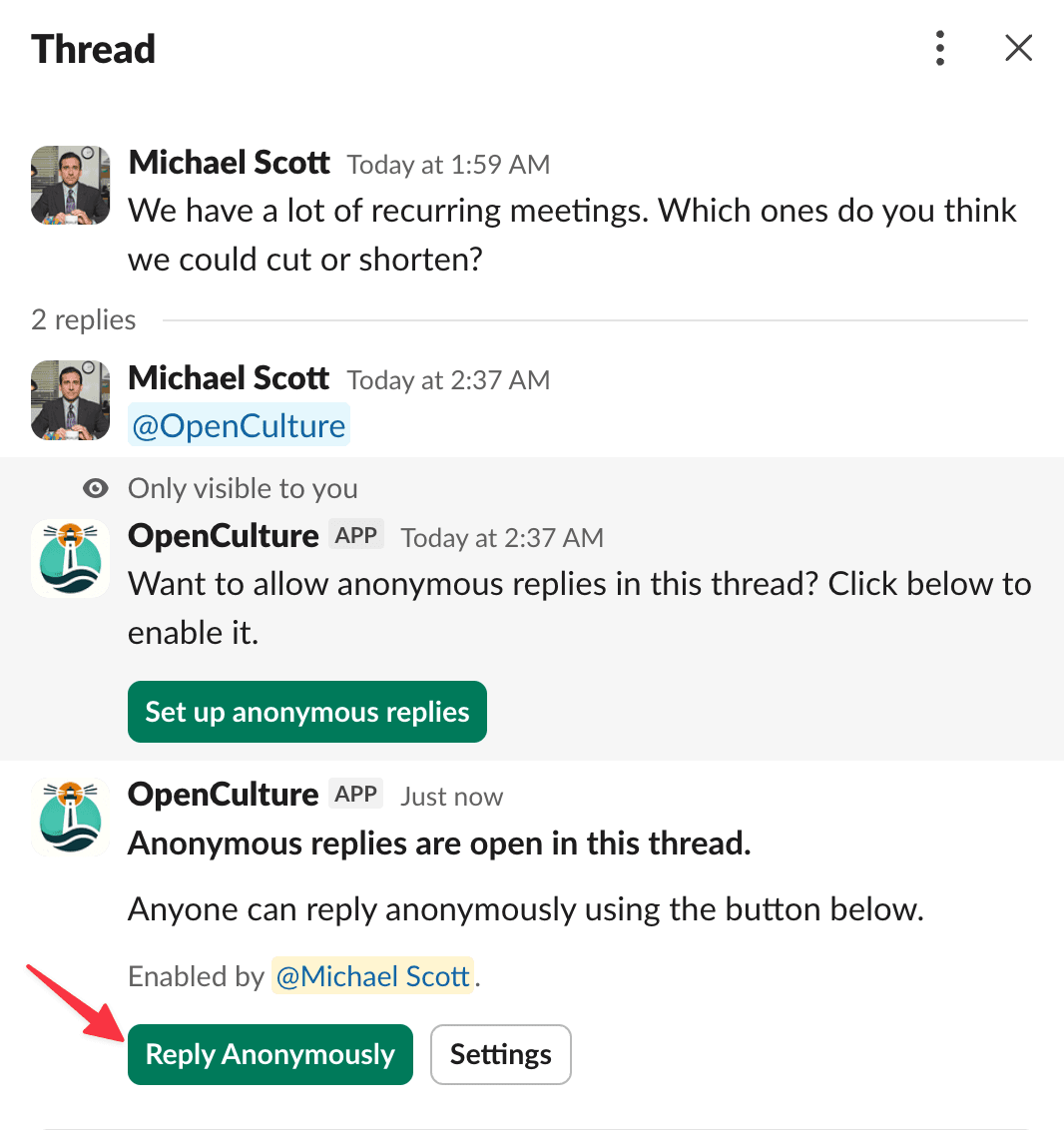
Once anonymous replies are enabled for a thread, a "Reply Anonymously" button appears in every message within that thread. Here's the full flow:
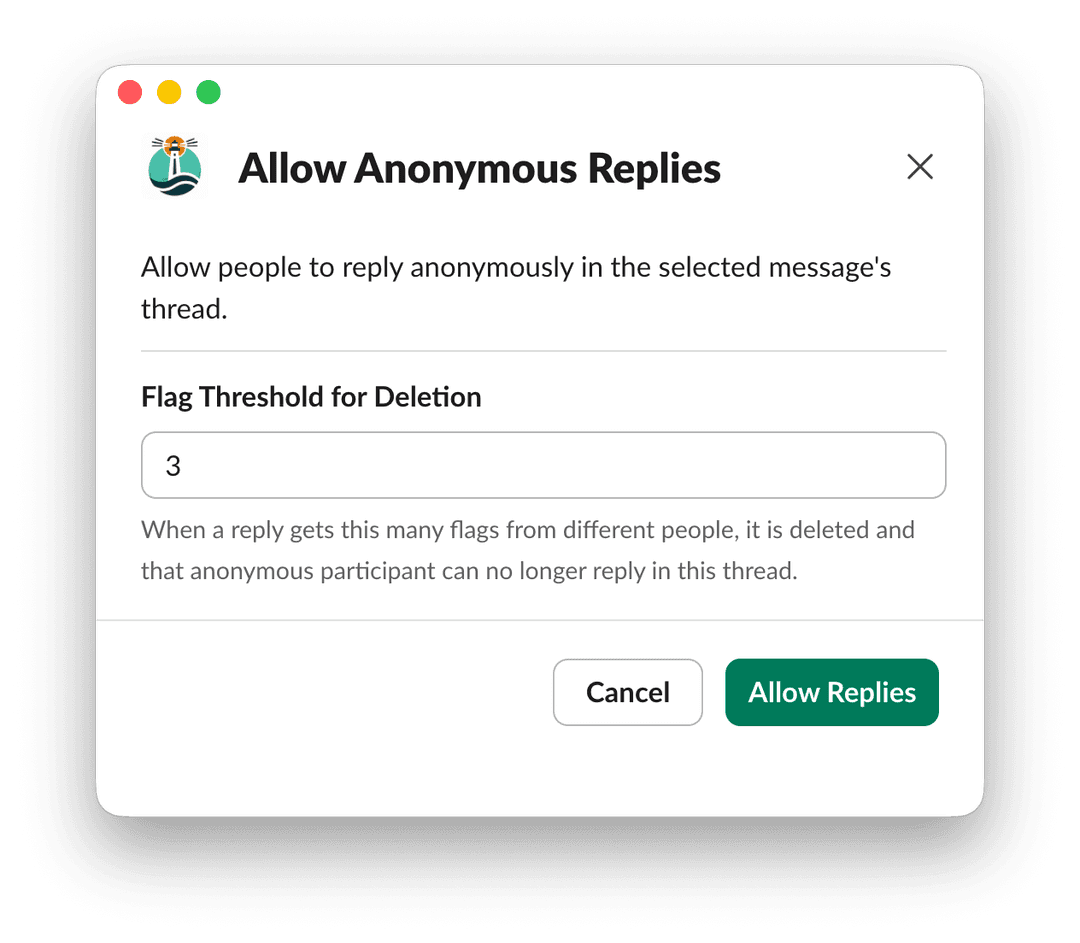
When you trigger the setup (via @mention or message shortcut), a screen appears where you can set the flag threshold — the number of community flags needed to auto-remove a reply. Once you confirm, the thread is open for anonymous replies.
Step 2: The Reply Anonymously Button Appears
A controller message is posted in the thread so everyone knows anonymous participation is available. ✅ Members of the channel can now use it to reply without revealing their identity.
Tip: If you're seeking feedback from a specific group, tag them in the thread to let them know they can now use this to share their thoughts anonymously.
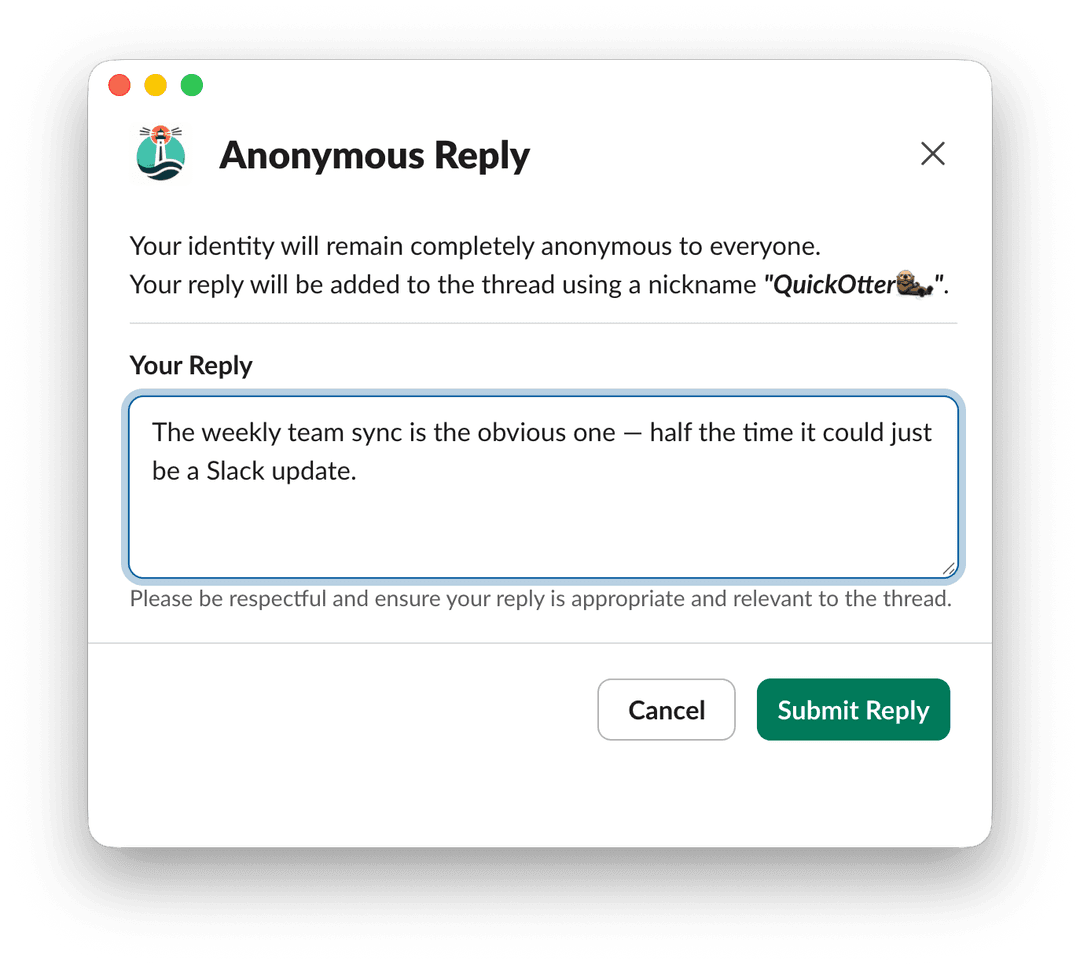
Step 3: Type Your Reply Privately
Clicking the button opens a private window visible only to you. Type your reply and submit — no one sees who is typing.
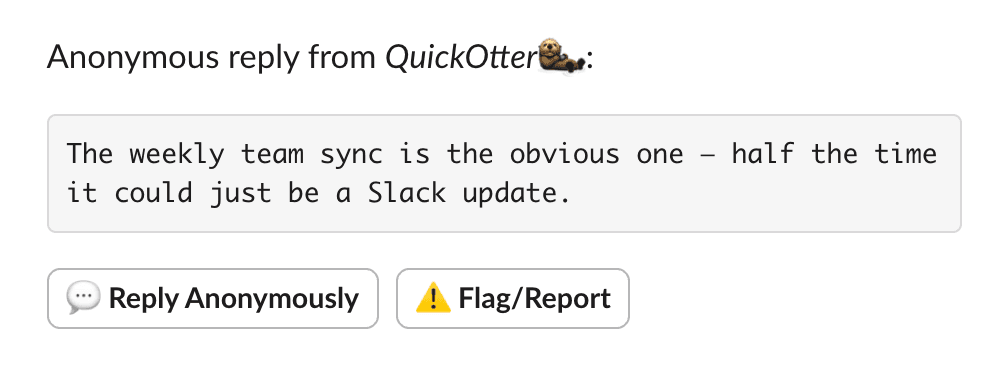
Step 4: Reply Posted Under a Pseudonym
Your reply appears in the thread attributed to a randomly assigned nickname. Others can click Reply Anonymously to continue the discussion.
Features
Consistent Pseudonyms
Each person is assigned a unique pseudonym per thread. If you reply anonymously twice in the same thread, both replies appear under the same nickname — so readers can follow the conversation without knowing who you are. This preserves conversational coherence while protecting identity.
Community Flagging & Moderation
Every anonymous reply includes a Flag/Report button. If a reply is inappropriate, offensive, or off-topic, any participant can flag it. Once the number of flags reaches the configured threshold (default: 3), the reply is automatically removed and the user is banned from further replies in that thread.
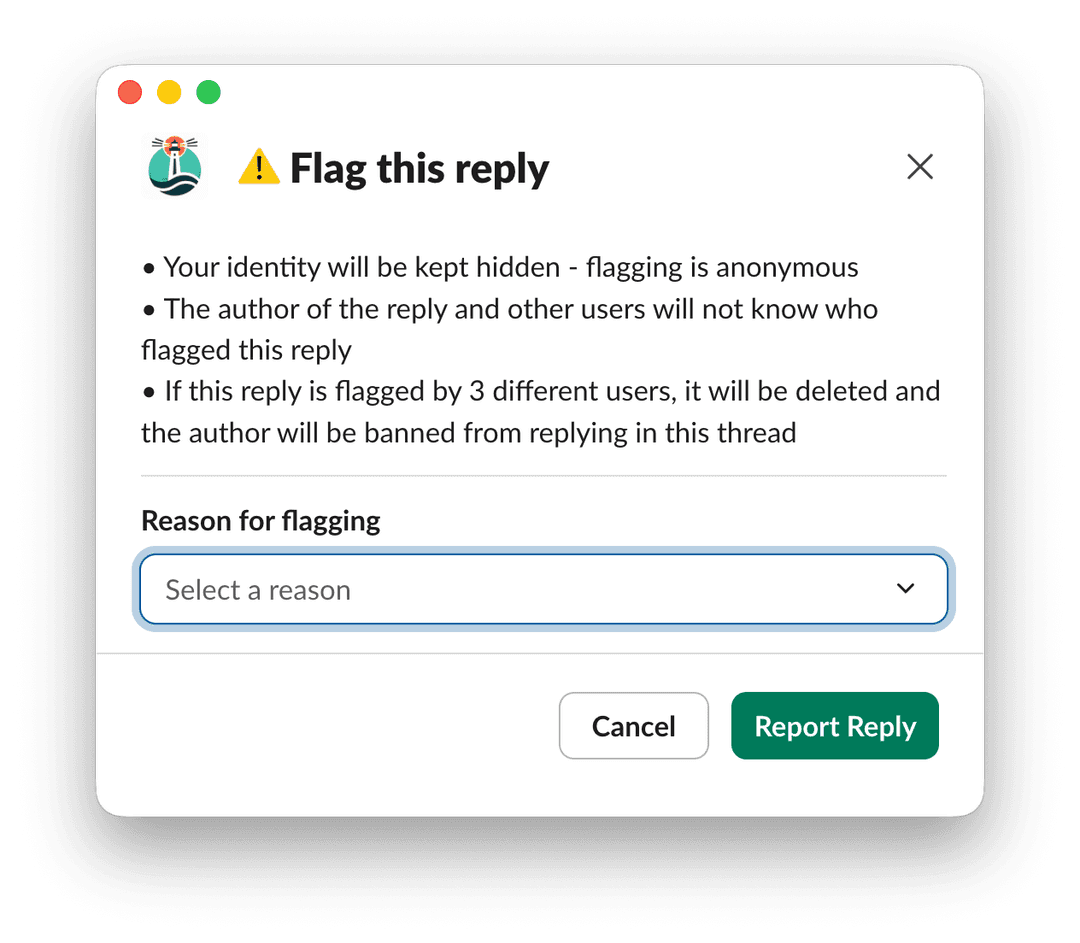
This keeps conversations constructive without requiring a dedicated moderator to watch every thread.
Common Use Cases
Here are situations where teams get the most value from anonymous comments:
- Town halls & all-hands threads — Employees can comment honestly on announcements from leadership without fear of repercussion
- Post-mortem discussions — Engineers and PMs can share candid views on what went wrong without blame dynamics
- Peer feedback threads — Structured feedback sessions where honesty matters more than politeness
- Sensitive HR announcements — People can ask follow-up questions or share anonymous feedback without exposing themselves
- Poll follow-up discussions — After a poll result is posted, team members can anonymously explain their vote
- Leadership AMAs — Employees who already asked anonymously can continue the dialogue with anonymous follow-up comments
Try It Yourself
OpenCulture offers a 14-day free trial. Install it once and you immediately unlock anonymous Q&A, anonymous polls, anonymous thread replies, and peer kudos — all in one Slack app.
Click the button below or head over to OpenCulture in the Slack App Marketplace and click Add to Slack. No permissions? Ask your Slack admin to install it for your workspace.
Privacy you can trust:
- Admin-blind anonymity — even workspace admins cannot trace who submitted a reply
- EU data residency available for teams that need it
- Slack Marketplace approved — reviewed and vetted by Slack's security team
Conclusion
Anonymous comments fill a real gap in Slack. They let people participate in thread discussions without putting their name — and potentially their workplace relationships — on the line. Whether it's a town hall thread, a post-mortem, or a sensitive poll follow-up, giving your team the option to comment anonymously leads to more honest, more complete conversations.
OpenCulture makes it easy: tag the bot or use the message shortcut, and any thread becomes a space for candid, anonymous comments in seconds.
Frequently Asked Questions
Can you reply anonymously in Slack?
Slack does not support anonymous replies natively. A privacy-focused Slack app such as OpenCulture can enable anonymous replies on an existing thread without attaching the reply to the sender's visible Slack profile.
Can workspace admins see who posted an anonymous reply?
With OpenCulture, anonymous replies are admin-blind, so workspace admins, channel managers, and other participants cannot trace a reply back to its author.
How do you enable anonymous replies on a Slack thread?
Mention @OpenCulture in the thread or use the OpenCulture message shortcut, configure the flag threshold, and enable anonymous replies. Channel members can then use the Reply Anonymously button.
Can anonymous Slack replies be moderated?
Yes. OpenCulture includes community flagging. When a reply reaches the configured flag threshold, it is removed and the account behind it can be blocked from posting more anonymous replies in that thread.


